Showerboard: building a battery e-Paper transit display that never lies
Morning transit anxiety is weirdly specific: you are halfway through getting ready, your hands are wet, and you just want to know one thing — do I have five minutes, or do I need to leave right now?
Checking a phone breaks the calm (and immediately pulls you into notifications). So I built Showerboard: a small, battery-powered e-Paper display that sits by the shower and shows the time, weather, battery percentage, and the exact minutes left before I have to walk out the door.
The single design rule: never lie on e-Paper
An e-Paper display keeps showing the last frame even after power drops or Wi-Fi fails. That property is amazing for battery life and dangerous for a countdown: a stale "5 min" on a frozen screen is worse than no screen at all.
So every rule in the display logic is built around honesty:
- Floor to the worst moment before the next refresh. Remaining time is
departure (with live delay) - now - walk_min - prep_min, evaluated atvalid_until(the next scheduled refresh) and floored. If the screen says5 min, you are guaranteed at least five minutes until the screen updates. - Urgency vs. already missed. Under two minutes flips the row to solid black (
LEAVE!). If a train hasn’t departed yet but there is less than walking time left, it is explicitly flaggedLATEand paired with the next catchable departure underneath. - Refuse stale numbers. Cancelled trips are dropped. If the transit API is unreachable or the last successful response is older than 180 seconds, the countdown is wiped and replaced with
STALE DATArather than showing an old minute count. - Hide the clock during sleep. Outside configured morning hours the board goes into deep sleep and hides the clock completely — a frozen clock on e-Paper looks broken.
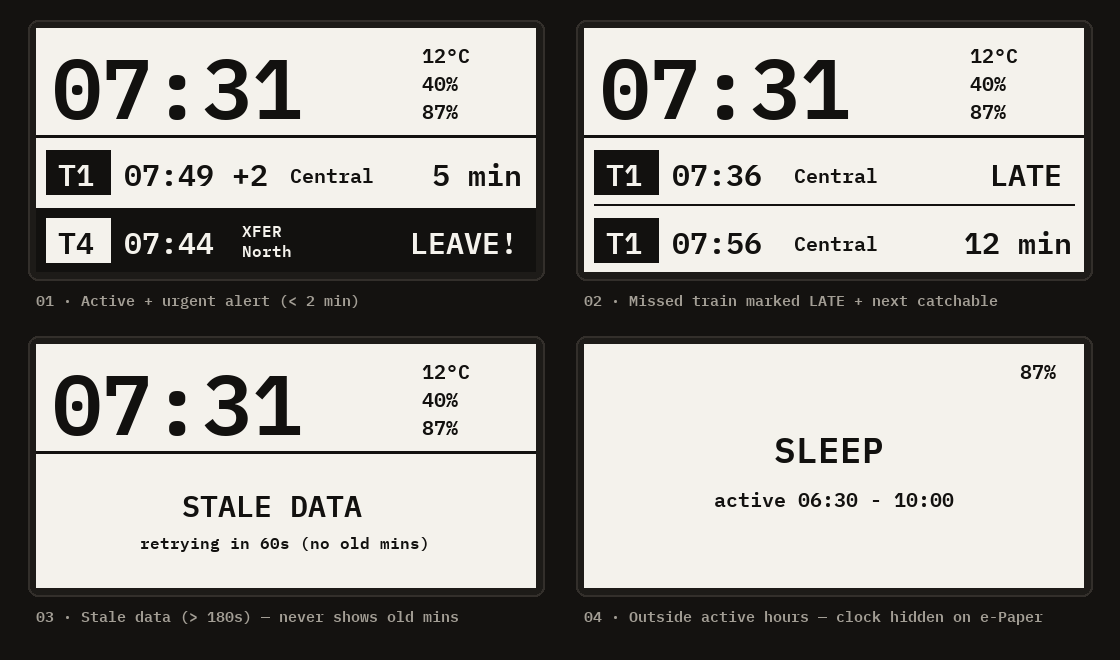
Embedded quirks worth solving cleanly
Two small details made the firmware noticeably nicer to live with:
- Reading battery voltage on a Pico W without fighting Wi-Fi. On the Pico W, the
VSYS/3voltage divider sits onGPIO29(ADC3), which is shared with the CYW43 Wi-Fi chip’s SPI clock line (withGPIO25as chip select). Reading ADC while Wi-Fi is active returns garbage. The fix is to measure only while the radio is off, temporarily release the pin, discard the first sample, average eight readings, and hand the pin back:
from machine import ADC, Pin

def read_vsys(samples=8):
    Pin(25, Pin.OUT, value=1)   # deselect CYW43 Wi-Fi chip
    Pin(29, Pin.IN, pull=None)  # switch GPIO29 to analog input
    adc = ADC(3)
    adc.read_u16()              # discard first reading
    total = sum(adc.read_u16() for _ in range(samples))
    v = total / samples * 3.3 * 3 / 65535
    Pin(29, Pin.ALT, pull=Pin.PULL_DOWN, alt=7)  # return to Wi-Fi
    Pin(25, Pin.OUT, value=0)
return v- Phone setup via captive portal + QR code. Hardcoding Wi-Fi credentials or transit stop IDs gets old fast. Holding the physical side button switches the Pico into an access point and draws a QR code directly on the e-Paper screen; scanning it opens a tiny local web form to configure Wi-Fi, active hours, and stop settings without touching a USB cable.
Designing the screwless 3D enclosure with Forge
Getting the electronics working on a desk takes a weekend; turning a stack of a Pico W, an e-Paper hat, a 1000 mAh LiPo pouch, a TP4056 USB-C charger board, and a 12×12 mm tactile button into a clean enclosure is where most DIY projects stall.
This project is actually what pushed me to build Forge (github.com/mskasal/forge). Instead of eyeballing dimensions in a GUI CAD tool or letting an AI guess board sizes, every physical component went into code with caliper measurements (EPD_W = 65.11 mm, BATT_T = 10.44 mm, HW-373 = 27.93 × 17.12 mm, BTN = 12.0 × 7.3 mm).
Three habits from the Forge workflow saved hours of wasted plastic:
- Print tiny fit coupons before the full shell. Before printing the full housing, I generated two 15-minute test slices: one solely for the slide-in USB-C charger pocket (
usbc_test) and one for the 12×12 tactile switch pocket and U-lock (btn_test). Once both clicked cleanly in hand, those exact parametric dimensions dropped straight into the main body. - Four screwless, support-free parts. The final enclosure prints flat on the bed with zero supports:
- Front body — recessed window for the active e-Paper area, ribbed sides, a 15° desk/ledge stand, a horizontal teardrop cutout for the switch shaft, and a USB-C slot.
- Back cover — holds the LiPo pouch, the slide-in USB-C charger module, four internal standoffs that gently press the e-Paper flush against the bezel, and two tiny pinholes aligned over the charging status LEDs.
- Button U-lock — slides into internal rails behind the tactile switch to eliminate vertical play without a single screw.
- Accent button cap — printed separately in a contrasting color with a tight press-fit socket onto the switch stem.
- Inspect in 3D before slicing. Every revision ran through Forge’s layer printability scan (
print_scan) and pushed straight to the 3D web/Apple TV preview so I could orbit internal clearances and check wall thickness before ever sending a.gcode.3mfto the printer.
Showerboard is still a personal build rather than a packaged product, but building it taught me two things that directly shaped everything I’ve worked on since: small, single-purpose physical displays feel much calmer than phones, and giving an AI agent a strict parametric CAD loop (Forge) turns custom hardware enclosures from a chore into a fast evening iteration.